Clicky

20151124

Capacitor Plague

Condensatoren zijn passieve electronische componenten die gebruikt worden om fluctuaties on de voedingsspanning op te vangen. Eigenlijk een soort mini-batterij die razendsnel oplaadt en dus ook razendsnel ontlaadt. Ze worden in alle elektronische apparaten gebruikt, van Apple Watch tot de voeding van je versterker. Condensatoren zorgen er dus voor dat je apparaat stabiel blijft werken zelfs als er opeens wat meer stroom wordt gevraagd of als je vriendin de magnetron aanzet (waardoor de 230V even een dipje krijgt).

Nu is er een probleem met een bepaald type condensator. De levensduur is korter dan verwacht. Hierdoor kan je apparaat al snel stuk gaan. Het probleem heet:"Capacitor Plague" en Wikipedia heeft er een uitgebreid artikel over.

Ik kwam (voor een prikkie natuurlijk) in het bezit van een Edimax ES-524G+ switch. De switch werkte prima maar voor de zekerheid toch even de kast opengeschroefd. Bij inspectie bleek dat er condensatoren op exploderen stonden en electroliet lekte:

Een lekkende en een 'bolle' condensator (gedemonteerd uit de switch)


De switch stond dus op het punt defect te raken. Dus bij een internet elektronicaboer 8 nieuwe condensatoren met dezelfde eigenschappen (1000µF/10V) gekocht. De oude condensatoren verwijderd en de nieuwe gesoldeerd en voila, deze switch kan weer jaren mee!

De nieuwe condensatoren zijn rood dus steken mooi af bij de rest:


20151104

Choose your favorite new Lenovo logo


New Lenovo logo
Alternative logo (inspired by Google)

Alternative logo (inspired by Heineken)


Note that the "smiling e" is an invention by Freddy Heineken himself when he created the new Heineken logo in 1949 (!). Still going strong:

20151029

McDonalds as Disaster Recovery location

McDonalds and similar (fastfood) restaurants provide everything you need for a Disaster Recovery office location. Furniture, food, drinks, HVAR, sanitation, cell phone coverage, parking space and, very important, free WiFi! So, for the immediate recovery of a disaster you and you colleagues can settle in the nearest fastfood restaurant and continue your work. However, the used WiFi connection can be "open" and unsecured!


Assuming that your IT infrastructure is still available, you can use McDonalds' WiFi and your existing VPN solution to connect to corporate applications and data. Maybe many of your colleagues are not using VPN (often) and they might be struggling to set up a VPN connection. Or your company might have a policy that you always have a VPN session to the datacenter and use an "Always Tunnel" configuration.

In these cases you can configure an "always on VPN" network configuration with DirectAccess (Windows) or OpenVPN (Open Source) or with another VPN solution. But how do you prevent that VPN credentials are stolen from PCs that are all or not connected to the corporate network? Answer: use a Trusted Platform Module (TPM) to store and protect the VPN credential. You can create a VPN Digital Certificate and use the TPM to create and protect that credential with free or licensed TPM middleware.

This "always on VPN" configuration is fully transparent to user, gives the company full control over the data streams from/to corporate client PCs even when they are out in the field, and it is impossible to copy or steal the VPN credential from the PC. Consider that using and managing the TPM can be fully automated ("Zero Touch") and with a very low investment you have the best security and Identity Management protection that is available on the market today (and tomorrow!).

For more information about TPMs and how to deploy them for ultra secure VPN and other Identity Management solutions: beaukey@gmail.com


20151017

Unclutter Start Menu from Office 2016 shortcuts

When you installed a Microsoft Office version in the old days, a Start Menu "Microsoft Office xxxx" folder was created with the Office application shorcuts. However Office 2016 creates shortcuts directly in the Start Menu and clutters up the Start Menu (due to alphabetic order):


With 2 commands/it is possible to move all Microsoft Office 2016 links to the "Microsoft Office 2016" group in the Start Menu:

md "C:\ProgramData\Microsoft\Windows\Start Menu\Programs\Microsoft Office 2016"
move "C:\ProgramData\Microsoft\Windows\Start Menu\Programs\*2016.lnk" "C:\ProgramData\Microsoft\Windows\Start Menu\Programs\Microsoft Office 2016\"


Execute the commands with elevated (Administrator) privileges and the Start Menu is clean and tidy and all Office shortcuts are where they belong:


20150920

Document scan with VBSscript and WIA

Windows Image Acquisition (WIA) is the still image acquisition platform in the Windows family of operating systems

In 2007 I published a VBscript that was used to create a BMP file from a document scan. That WIA method is obsolete so I updated the script to this:

OPTION EXPLICIT

'--- dim objects...
dim wsh, fso, objWIAdialog, objImage, imgFilename
set wsh=CreateObject("wscript.shell")

set fso=CreateObject("scripting.filesystemobject")
set objWIAdialog = CreateObject("WIA.CommonDialog")

'--- Start the Scanner dialog box, where a scanner can be selected...
set objImage = objWIADialog.ShowAcquireImage

'--- Save and show the scan if the scan was successful...

If Not objImage Is Nothing Then 
    Randomize
    imgFilename=
fso.GetSpecialFolder(2) & "\Scan2BMP" &  Int((999999 - 100000 + 1) * Rnd + 100000) & ".bmp" 

    wscript.echo "Scan stored as BMP in file: " & imgFilename
    objImage.SaveFile imgFilename
    wsh.run(imgFilename)
End if    


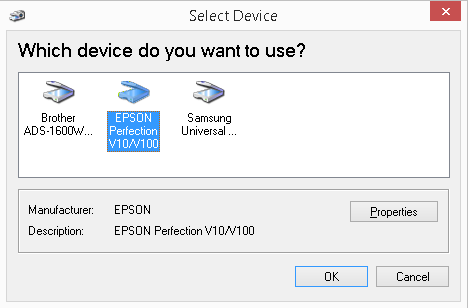
The script will start a WIA dialog that let you select the scanner and set scan properties.


After the scan, the BMP file started in the default BMP viewer.


20150909

TLD filter in hMailserver 5

As I wrote in a previous post hMailserver can be tweaked. In this post I will show a simple TLD filter. This filter is used to block emails from certain Top Level Domains, especially from countries that host many attackers.

Add this code to the hMailserver 'EventHandlers.vbs' script:

Sub OnSMTPData(oClient, oMessage)

'--- Space before the first and after the last country name are required (see TK's comment)...
 Const BlackList=" AR VN CN CO IN BR KE MX TH RO BG KZ TW RU TH "
 Dim TLD

  TLD=Mid(oMessage.FromAddress,Instr(oMessage.FromAddress,".") + 1)
    if Instr(Blacklist,uCase(TLD))>0 then
      Eventlog.Write("OnSMTPdata: TLD in Blacklist " & oMessage.FromAddress & ". 542 Rejected" )
      result.value=1
    End if    
 End Sub

That's all! Happy emailing!

20150829

'Syncthing' Windows install script

Pulse was a (not continued) fork of Syncthing (https://syncthing.net/) I spend a couple of posts about installing and configuring Pulse which are more less covering Syncthing too.

One thing has not been fixed for the Windows version of Syncthing: computer resources when Syncthing is active. I have described how to mitigate this but the next script does it all for you. It will (re-)install the Syncthing Windows service with an affinity for a single CPU and at a low priority.

The script requires that NSSM (http://www.nssm.cc/download) x86 or x64 executable is installed in the same folder as the script.


cls

net sessions >nul 2>nul
if %errorlevel% NEQ 0 (
    echo *** This script requires Admin privs. Exiting...
    pause
    goto :EOF
)


net stop syncthing
sc delete syncthing
taskkill /f /im syncthing.exe

md "%ProgramData%\syncthing" >nul 2>nul

nssm install syncthing "%ProgramFiles%\syncthing\syncthing.exe"
nssm set syncthing Application     "%ProgramFiles%\syncthing\syncthing.exe"
nssm set syncthing AppDirectory    "%ProgramFiles%\syncthing"
nssm set syncthing AppParameters "-home=%ProgramData%\syncthing -logfile=%ProgramData%\syncthing\syncthing.log -no-console -no-browser"
nssm set syncthing AppPriority IDLE_PRIORITY_CLASS

::--- Assign one of the %NUMBER_OF_PROCESSORS% cores to Syncthing service (but exclude core #0)...
set /A a="%RANDOM% %% (%NUMBER_OF_PROCESSORS%-1)" + 1
nssm set syncthing AppAffinity %a%


net start syncthing
ping -n 11 127.0.0.1 >nul
start https://127.0.0.1:8384/


Once the service is (re-installed) you can check the Windows task manager what Syncthing is consuming on CPU resources:


Real Time Web Analytics